



How to Build a Video Template System for Bulk Video Creation
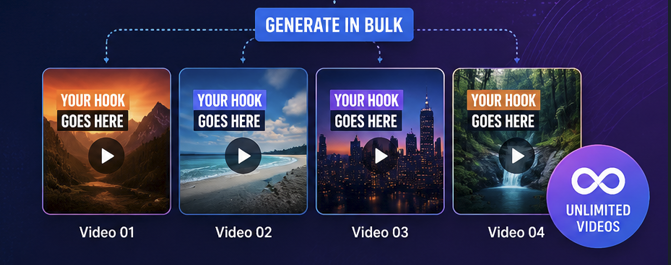
If you’re trying to scale video content in 2026, doing everything manually is basically a self-imposed bottleneck.
The real upgrade isn’t editing faster — it’s building a system that lets you produce videos in bulk without rebuilding each one from scratch.
That’s where a template system in tools like Video Fission comes in.
This guide breaks down exactly how to build a structured video template system for bulk creation that actually scales.
What a video template system actually is
A video template system is a reusable framework that defines:
- Video layout structure
- Timing and sequence
- Fixed branding elements
- Dynamic content placeholders
- Automated variation slots
Instead of creating each video individually, you design one structure that generates unlimited variations.
Think of it like this:
You’re not making videos anymore — you’re building a production engine.
Why template systems are essential for bulk video creation
Without a system, bulk video production looks like this:
- Repetitive manual editing
- Inconsistent branding
- Random pacing and structure
- Slow scaling
- High error rate
With a template system:
- Videos follow a predictable structure
- Content can be swapped instantly
- Branding stays consistent
- Production scales efficiently
- Output becomes repeatable and automated
The difference is not small — it’s the difference between “content creator” and “content system operator.”
Step 1: Define your video structure (the backbone)
Every strong template starts with a fixed structure.
A proven format looks like this:
1. Hook (0–3 seconds)
This is your attention trigger.
- Bold statement
- Question
- Visual disruption
If this fails, nothing else matters.
2. Core content sections
Break the message into modular blocks:
- Block 1: Problem or idea
- Block 2: Explanation or value
- Block 3: Supporting detail or example
Each block should stand alone so it can be replaced or shuffled.
3. CTA section
The final segment should guide action:
- Follow / subscribe
- Visit link
- Watch next video
Keep it consistent across templates for branding reinforcement.
Step 2: Build dynamic content slots
This is where bulk creation becomes powerful.
Instead of hardcoding everything, you create variables, such as:
- Text placeholders (titles, captions, hooks)
- Image/video placeholders
- Topic variables
- AI-generated script inputs
- Product or keyword inserts
In Video Fission, these slots are what allow one template to generate hundreds or thousands of unique outputs.
Step 3: Separate fixed vs dynamic elements
This is one of the most important rules in template design.
Fixed elements (never change):
- Branding style
- Font system
- Layout structure
- Animation style
- CTA format
Dynamic elements (change per video):
- Text content
- Media assets
- Hooks and captions
- Topics or themes
If you mix these two, scaling breaks immediately.
Step 4: Keep design minimal and scalable
A common mistake is over-designing templates.
Avoid:
- Too many animations
- Multiple font changes
- Complex transitions
- Heavy visual clutter
Instead:
- Stick to 1–2 fonts
- Use consistent motion style
- Keep layouts clean and modular
Simplicity is what makes bulk production stable.
Step 5: Build 1–3 master templates (not 20)
More templates does NOT mean better scaling.
A strong system usually starts with:
- 1 main template (core format)
- 1 variation template (alternate pacing)
- 1 experimental template (testing ideas)
That’s it.
The goal is consistency, not chaos.
Step 6: Connect content sources for automation
Once templates are ready, plug in your content sources:
- Script generators or AI text
- Media libraries
- CSV or database inputs
- Topic feeds
This is what turns your system into a real bulk creation pipeline.
Step 7: Generate, review, refine
Your workflow becomes:
- Generate bulk videos from template
- Review output quality
- Fix edge cases only
- Avoid rebuilding the whole system
You’re optimizing the machine, not hand-editing every output.
Common mistakes to avoid
Don’t treat templates like one-off videos. If every template is a “special case,” you’ll never scale anything properly — you’ll just stay stuck editing forever.
A lot of people also try to cram too many moving parts into one template. It feels powerful at first, but it usually just makes everything break when you start generating in bulk.
Timing is another thing people ignore way too often. If your pacing changes from template to template, your outputs start feeling random even if the visuals look fine.
And probably the biggest mistake — jumping straight into bulk generation before you’ve even tested the template properly. One small issue in the structure can multiply into a mess across hundreds of videos.
Conclusion
A video template system inside VideoFission isn’t just a workflow trick — it’s the foundation of scalable content production.
Once your system is built correctly, bulk video creation stops being a manual task and becomes a repeatable process that runs on structure, not effort.
In the end, the real advantage isn’t creating more videos — it’s building a system that creates them for you.